SmartWatch Connect for Android
JedyAppsLibraries & Demo
3.982.00 Reviews
- Version
- 23.1
- Installs
- 100.00K
- Age Rating
- Everyone
Screenshots
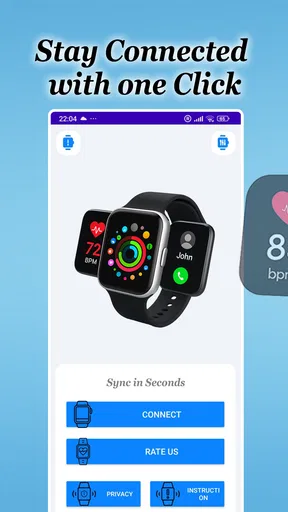
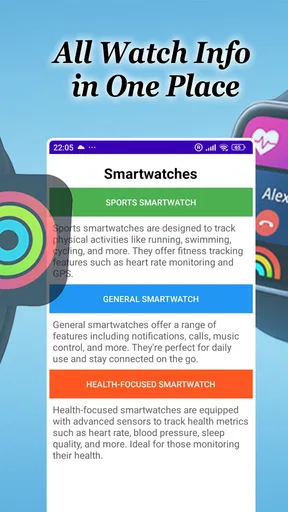
Our Review of SmartWatch Connect for Android
 Analysis by Appyee
I spent time using SmartWatch Connect as a simple bridge between an Android phone and a Bluetooth smartwatch, and its appeal is easy to understand: it focuses on one practical job rather than trying to become a full health, fitness, or watch-face platform. JedyApps places it in the Libraries & Demo section, but the everyday experience feels more like a utility for people who want phone notifications to reach their wrist without adding another complicated ecosystem.
The app is free, aimed at Everyone, and works on devices running Android 7.0 or later. Its current version is 23.0, while the project itself appeared on April 21, 2024. Those details matter because compatibility is often the first concern with Bluetooth tools: an app can be useful in theory but frustrating if the phone is too old or the watch expects a different connection method.
My overall impression is that this is best viewed as a focused notification companion. It can make a smartwatch more useful during a busy day, especially when checking the phone repeatedly would be distracting. At the same time, I would not treat it as a universal replacement for a watch manufacturer’s official companion. The right choice depends heavily on how much control your particular watch needs.
How SmartWatch Connect feels in everyday use
I’d judge SmartWatch Connect by how clearly it fits into your routine, not by expecting it to replace every tool that came with your watch. In the next section, I’ll focus on the practical choices that help keep a notification bridge useful rather than distracting, including when it makes sense to rely on the watch and when the phone is still the better place to manage alerts.
Speed expectations when connecting a phone and watch
The first thing I noticed is that the app’s job is relatively narrow. It is not trying to load a large social feed, render a detailed dashboard, or manage a library of media. That gives it a naturally lighter feel than many feature-heavy smartwatch platforms. When the Bluetooth relationship is already in place, the useful result is straightforward: notifications can appear on the watch instead of requiring me to pull the phone from my pocket.
That simplicity also sets a fair expectation. SmartWatch Connect is not the sort of app I would choose for instant access to every watch setting, advanced workout analysis, or a deep catalog of downloadable content. Its value comes from reducing friction around alerts. If your main goal is to glance at incoming information, the focused design makes sense. If you expect a complete control center, the experience may feel limited rather than fast.
Bluetooth connections are also affected by the devices involved, so I would judge responsiveness over several ordinary situations rather than by one first impression. A connection that feels immediate at home may need another moment after the phone has been away from the watch, after either device has been restarted, or after Bluetooth has been toggled. That is not a reason to dismiss the app, but it is important to understand that a notification bridge cannot remove every limitation of the wireless connection itself.
A useful setup habit is to pair the watch before relying on the app during an important day. I would send a few ordinary test notifications, lock the phone, and walk through the places where I normally use the watch. This quickly shows whether the arrangement suits my routine. It is more informative than simply seeing a successful pairing message once.
What happens during heavier notification use
The demanding moment for this kind of tool is not opening its interface. It is the steady stream of alerts that arrives while the phone is busy. Messages, calendar reminders, delivery updates, and other interruptions can make a notification companion feel either invisible or annoying. In the best case, the app quietly passes along what matters. In the less comfortable case, the wrist becomes a second source of noise.
I found that the most sensible way to use SmartWatch Connect is to treat it as a filter in my daily habits, even when the app itself is not the place where every notification decision is made. Before leaving the house, I would decide which alerts genuinely deserve a wrist glance. That keeps the watch useful for quick awareness instead of turning every phone event into a vibration or screen wake.
There is a practical trade-off here. Receiving notifications on the wrist can save time, but it can also encourage constant checking. For work, commuting, or errands, the benefit is clear: I can decide whether an alert needs a full reply without unlocking the phone. During focused work, exercise, meals, or sleep, I may prefer fewer interruptions. The app is most effective when it supports that choice rather than becoming an always-on mirror of the phone.
Resource demands are difficult to judge from a short session because Bluetooth behavior, phone settings, and the connected watch all influence the result. I would not promise that every phone will experience identical battery behavior. Still, the app’s focused purpose gives me fewer reasons to expect the kind of heavy activity associated with a large media or navigation application. If battery life becomes a concern, I would first examine the number of alerts reaching the watch and the watch’s own connection settings before blaming the bridge alone.
Reliability and recovering from a missed connection
Reliability matters more here than visual polish. A smartwatch connection is only useful if I can trust it during ordinary moments, such as carrying groceries, walking through a station, or leaving the phone in another room. I would therefore evaluate SmartWatch Connect by asking a simple question: after a temporary interruption, is it easy to get back to a working state?
My preferred recovery routine is deliberately simple. I check that Bluetooth is enabled, confirm that the watch still has power, and then give the phone and watch a moment to find each other again. If that does not work, I would close and reopen the app before attempting a more disruptive step. Re-pairing should be a later option, not the first reaction, because removing an existing pairing can create extra work and may affect other watch functions.
This is also where expectations about an independent utility need to stay realistic. Some watches are designed around a manufacturer’s own application, and that official software may handle firmware, accounts, health records, watch faces, or device-specific controls more reliably. SmartWatch Connect makes more sense when the central need is notification connectivity and the official route is unavailable, excessive for the situation, or not the experience I want.
I would not recommend judging reliability solely by whether every notification appears at the exact same instant as it does on the phone. Wireless delivery can vary, and a watch may be asleep, out of range, or handling another task. The more useful test is whether the normal connection remains dependable across a full routine and whether recovery is understandable when something interrupts it.
Device constraints that affect the experience
The minimum requirement of Android 7.0 or later makes the app accessible to a broad range of Android phones, including older hardware that may not run newer companion platforms comfortably. That is a genuine advantage for someone with an aging phone who wants a straightforward smartwatch connection rather than a demanding all-in-one application.
At the same time, Android compatibility alone does not guarantee identical behavior with every watch. Bluetooth implementations differ, and watches vary in how they receive, display, or organize alerts. A basic notification-focused watch may be a natural match. A premium model with its own tightly integrated software may offer a better experience through the manufacturer’s application, especially if I want advanced device management rather than a simple link to phone alerts.
Older phones can also introduce their own constraints. Even when the operating system meets the requirement, background activity may be managed aggressively, storage may be tight, or Bluetooth hardware may be less consistent than on a recent device. I would keep the phone’s system software reasonably maintained, avoid changing several connection settings at once, and test the arrangement before depending on it for urgent reminders.
The watch itself is just as important. A Bluetooth smartwatch with a small display may show only a shortened notification, while another model may handle the same alert differently. That is not necessarily a flaw in SmartWatch Connect. It is a reminder that the app sits between two devices and cannot make a limited watch behave like a full-featured one.
Who will benefit most from this app
I see the strongest use case in a person who already owns a compatible Bluetooth smartwatch and mainly wants to notice phone activity without constantly reaching for the handset. Imagine waiting for a delivery update while working at a desk: a brief look at the wrist can tell me whether the alert is worth interrupting my task. The same approach works for a commuter who wants to screen incoming messages before deciding whether to stop and respond.
It can also suit someone using an older Android phone. Because the minimum operating system is Android 7.0, the app does not automatically exclude devices that are several generations behind current phones. That makes it a reasonable utility to try when a full official companion feels too demanding or when the watch’s notification function is the main priority.
I would be more cautious if my watch is central to my fitness routine, health tracking, payments, navigation, or voice interactions. In those cases, a manufacturer’s companion app is usually the more logical starting point because it is designed around the complete device rather than one connection task. SmartWatch Connect should not be selected simply because it is free; it should be selected because its narrower purpose matches what I actually need.
Useful habits that make the connection less frustrating
One non-obvious lesson is to test the app with the phone in the places where the connection will matter. A desk test proves very little if I plan to use the watch while moving between rooms, commuting, or carrying the phone in a bag. I would try a short walk, let the screen remain locked, and send a few different kinds of alerts. That exposes practical weak points before they become an urgent problem.
A second helpful habit is to separate pairing problems from notification problems. If the watch cannot connect at all, I would focus on Bluetooth status and the watch’s own connection state. If the watch connects but does not show a particular alert, I would examine the phone’s notification behavior and the way that watch handles incoming information. Treating both symptoms as the same issue can lead to unnecessary unpairing.
A third trade-off involves choosing when not to use the bridge. If I am trying to sleep, concentrate, or conserve attention, disconnecting the watch or reducing incoming alerts may be more useful than troubleshooting every missed vibration. A notification app should make the phone less intrusive, not create a new obligation to monitor the wrist.
Finally, I would keep the official watch application in mind even if SmartWatch Connect handles the daily notification task well. Firmware changes, device resets, and advanced settings may still require the manufacturer’s route. Using this app as a focused companion rather than assuming it replaces every other tool leads to a more realistic and less frustrating setup.
How it compares with the usual alternatives
The closest alternative is normally the watch maker’s own companion app. That option is usually preferable when I need deep device integration, account-based services, health information, firmware support, or watch customization. SmartWatch Connect has a different appeal: it is a lighter, more direct choice for people whose priority is getting phone notifications onto a Bluetooth smartwatch.
Compared with leaving the phone’s notifications entirely on the handset, the app can make quick screening more convenient and less disruptive. Compared with a full smartwatch platform, it is likely to feel more limited, but that limitation can be a strength for someone who does not want a large application handling every aspect of the watch.
The decision therefore comes down to control versus simplicity. Choose the official companion when the watch is an integrated part of a wider ecosystem. Consider SmartWatch Connect when notification access is the main requirement and a focused utility is enough. I would also remember that compatibility is personal: a smooth experience on one Android phone and watch combination does not guarantee the same result on another.
What the current adoption says, and what it does not
The app has passed 100K+ installs, with a 3.9 average from 694 ratings and 81 written reviews. That gives me useful context: it is established enough that many people have tried it, but the rating is not so high that I would install it without testing my own phone-and-watch combination.
Because it is free, trying it carries less financial risk. The real cost is time spent pairing, testing, and adjusting expectations. I would install it when I have a few quiet minutes, not immediately before a trip or an important appointment. That small amount of preparation is especially worthwhile for Bluetooth utilities, where the connected hardware has such a strong influence on the outcome.
The Everyone age rating also makes the app broadly approachable, but it says little about whether it is the right technical match for a particular watch. I would use the operating-system requirement as the first checkpoint, then consider the watch’s own capabilities and whether I need more than notification delivery.
My performance verdict
After weighing speed, heavier notification periods, recovery, and device constraints, I see SmartWatch Connect as a practical narrow-purpose app rather than a complete smartwatch command center. Its strongest quality is focus: it addresses the everyday gap between a phone and a Bluetooth watch without asking me to adopt a much larger workflow.
The main limitation is equally clear. A focused bridge cannot guarantee the depth, polish, or device-specific reliability of an official companion built for one watch family. Connection interruptions, watch limitations, and Android background behavior can still shape the experience. Anyone expecting advanced watch management should look elsewhere first.
For me, the recommendation is positive with a condition: install it if your priority is convenient notification access and you are willing to test the pairing with your own hardware. The free price and broad Android support make that trial reasonable. If the connection behaves consistently during your normal routine, the app earns its place by staying out of the way. If you need health tools, firmware control, customization, or a complete wearable ecosystem, the manufacturer’s alternative is the better choice.
JedyApps has created something most useful when its boundaries are understood. I would recommend SmartWatch Connect to a friend who wants a simple phone-to-watch notification link, especially on an older Android device. I would not recommend it as the only software for a feature-rich smartwatch. In that narrower role, its straightforward approach is convincing; beyond it, the trade-offs become much more noticeable.
Privacy and Permissions
See what permissions an app requests and how it handles your data.
- Location
- approximate location (network-based), precise location (GPS and network-based)
- Camera
- take pictures and videos
- Wi-Fi connection information
- view Wi-Fi connections
- Other
- view network connections, pair with Bluetooth devices, access Bluetooth settings, full network access, control vibration, prevent device from sleeping, Google Play license check
Verdict
Strengths of SmartWatch Connect for Android
- Quick pairing with many popular smartwatch brands.
- Keeps watch notifications and connection status easy to monitor.
- Useful battery and device information at a glance.
- Simple controls make it approachable for first-time smartwatch users.
- Can reduce the need to use the watch’s smaller screen for basic settings.
Limitations of SmartWatch Connect for Android
- Compatibility may vary between watch models and Android versions.
- Some features can require persistent background access.
- Connection stability may depend on Bluetooth range and phone settings.
- Extra permissions may be needed for notifications and device management.
- Battery use can increase when continuous synchronization is enabled.
Other Releases by JedyApps
View All
Holy Quran Offline Reading
Libraries & Demo4.4

Nail Art Design: Paint Nails
Beauty4.1
Similar Picks in This Category
View All
PGT: GFX, Launcher & Optimizer
Trilokia Inc.4.5

AusweisApp Bund
Governikus Service GmbH3.7

Cardboard
Google LLC3.2

Gamers GLTool with Game Tuner
Trilokia Inc.4.5

Multi Web Chat - Read Secretly
World Scan & Cleaner3.8

App Cloner Premium & Add-ons
App Listo1.9
Frequently Asked Questions
What is SmartWatch Connect for Android, and what does it do?
SmartWatch Connect is an Android companion app designed to link a compatible smartwatch or fitness wearable with your phone. After pairing, it may provide access to notifications, call alerts, activity information, watch-face settings, synchronization, and device preferences. The exact features depend on the watch model, the app version, and the permissions granted during setup.
Which smartwatches are compatible with SmartWatch Connect?
Compatibility can vary considerably, so users should check the watch manufacturer’s instructions and the app listing before downloading. Some versions may support specific Bluetooth smartwatches or generic wearable devices, while others are intended for one brand or product family. If your watch is not listed, the app might install successfully but fail to pair or synchronize correctly.
How do I connect my smartwatch to an Android phone?
First, charge the watch, enable Bluetooth on your Android phone, and keep both devices close together. Open SmartWatch Connect, allow the requested permissions, and select the watch shown in the device list. Confirm any pairing code on both screens. If connection fails, restart Bluetooth, remove previous pairings, update the app, and try the pairing process again.
What permissions does SmartWatch Connect require, and are they safe to allow?
A smartwatch companion app may request Bluetooth or nearby-device access, notifications, location, phone, contacts, and physical-activity permissions. These can support pairing, message alerts, caller identification, weather information, or fitness tracking. Review each request carefully and grant only what you need. Refusing optional permissions may disable particular features without preventing basic connection.
Why is SmartWatch Connect not syncing notifications or fitness data?
Notification and synchronization problems are often caused by restricted background activity, disabled notification access, low battery settings, weak Bluetooth connections, or an outdated app or watch firmware. Check the app’s permissions, allow it to run in the background, and ensure notification access is enabled in Android settings. Re-pairing both devices can also resolve persistent connection issues.
